The transition from the traditional piano bench, once overflowing with yellowed manuscripts and heavy volumes, to the sleek, minimalist setup of a single digital tablet marks one of the most significant shifts in musical history. As the classical world converges with the digital age, pianists across the globe face a pivotal question: should one adhere to the centuries-old tradition of printed scores or embrace the high-tech efficiency of digital tablets?
This evolution is not merely a matter of convenience; it touches upon cognitive learning patterns, performance reliability, and the preservation of musical heritage. Whether you are a concert professional, a dedicated student, or an adult hobbyist, understanding the profound differences between these two mediums is essential for optimizing your practice and performance.
Which is better: sheet music or a digital tablet? The answer depends on the context of use. Digital tablets are superior for portability, organization, and live performance flexibility, allowing musicians to carry thousands of scores in one device. Traditional sheet music remains superior for deep study, long-term eye health, and the tactile experience required for cognitive retention and spatial awareness of the score.
Musical notation is a specialized graphic language designed to symbolize the four fundamental elements of music: pitch, duration, timbre, and dynamics. This system allows a composer to communicate complex architectural sounds through time and space, enabling a performer to “hear” the musical conversation simply by scanning the staff.
The Evolution of the Staff and Clefs
The modern five-line staff is the result of nearly a thousand years of development. Early Western music relied on “neumes,” mnemonic symbols that provided only a vague approximation of melodic direction. It was the 11th-century theorist Guido d’Arezzo who introduced the concept of parallel lines to designate exact pitches, a development that professionalized musical literacy.
The “Treble Clef” (or G-clef) and “Bass Clef” (or F-clef) serve as the fundamental “keys” to unlocking the staff. The Treble Clef circles the second line from the bottom, designating it as G4, while the Bass Clef’s two dots surround the fourth line, designating it as F3. On the “Grand Staff,” these two systems are connected by “Middle C” (C4), which sits on a ledger line in the center of the musical “pitch-space”.
| Clef Type | Fixed Reference Point | Primary Use Case |
| Treble Clef | G4 (Second line) | Right-hand piano, Woodwinds, Violins |
| Bass Clef | F3 (Fourth line) | Left-hand piano, Cello, Bassoon |
| Alto Clef | C4 (Third line) | Viola, occasionally Trombone |
| Tenor Clef | C4 (Fourth line) | Upper register Cello and Trombone |
The physical score provides a fixed spatial reality for these symbols. In contrast, digital tablets can manipulate the size and layout of these clefs, offering “zoom” functions that assist those with visual impairments but potentially disrupting the “lecture à vue” (sight-reading) process by altering the expected spatial distances between notes.
The Physics of the Keyboard and Intervalic Relationships
The piano keyboard is a physical manifestation of the chromatic scale, a collection of twelve equal “semi-tones” (half steps) that repeat in octaves. Each note corresponds to a specific sound frequency, measured in Hertz (Hz). For instance, Middle C (C4) vibrates at approximately 261.6 Hz, while the A above it (A4) is tuned to the universal standard of 440 Hz.
Understanding the medium requires a mastery of “intervalles harmoniques.” A “half step” is the distance between any two adjacent keys, while a “whole step” spans two half steps. These intervals are the building blocks of scales and chords.
- Major Scales: Follow the pattern W-W-H-W-W-W-H (Whole, Whole, Half, Whole, Whole, Whole, Half).
- Natural Minor Scales: Follow the pattern W-H-W-W-H-W-W.
- Harmonic Minor Scales: Raise the seventh degree to create a “leading tone” that demands resolution to the tonic.
The printed page allows a student to visualize the “tetrachords” (four-note segments) of these scales side-by-side, fostering a holistic understanding of the Circle of Fifths, a pedagogical tool that maps the relationship between musical keys.
As an Amazon Associate I earn from qualifying purchases.
1. The Timeless Authority of Printed Sheet Music
For over five centuries, the printed page has been the standard for musical transmission. Beyond nostalgia, physical scores offer a set of pedagogical and ergonomic advantages that digital screens have yet to replicate perfectly.
The Tactile Connection and Spatial Memory
Extensive research suggests that reading from paper facilitates better comprehension and detail retention than reading from digital screens. A meta-analysis of reading performance indicates that when scrolling is required, comprehension drops significantly compared to the static printed page. This is critical for musicians who must track multiple “staves” (plural of staff) simultaneously while maintaining rhythmic accuracy.
The physical act of turning a page provides the brain with a “temporal anchor.” In a study published in Neuroscience, participants who read a story on paper were better able to remember the order of events than those who read on a Kindle. For a pianist, this translates to better memorization of the “structure” and “form” of a piece, such as a Sonata or a Fugue. The “tactile feedback” of paper, the weight of the book and the physical sensation of the fingers on the corner of the sheet, helps the hippocampus integrate “what” (the notes) with “where” (the page location).
Superior Visual Clarity and Eye Health
Traditional sheet music utilizes reflected light rather than the emitted light of a screen. This significantly reduces “Computer Vision Syndrome” (CVS) and digital eye strain. During four-hour practice sessions, the matte texture of high-quality cream paper (often used by prestigious publishers like Henle Verlag or Bärenreiter) provides a high-contrast, flicker-free experience that is gentler on the macula.
Professional musicians utilize “saccadic” eye movements to anticipate upcoming phrases. Expert music readers exhibit shorter “fixation durations” (the amount of time the eye stays still on a single point) because they process notes in “chunks” or patterns rather than individual letters.
| Metric | Expert Pianists | Novice Learners |
| Fixation Duration | Reduced (approx. 200-300ms) | Intensive/Longer |
| Saccade Amplitude | Longer (spanning measures) | Short (note-by-note) |
| Navigational Strategy | Concentrates on anchors | Systematic/Linear |
| Cognitive Load | Efficient/Optimized | High/Fragmented |
Digital tablets, if not properly optimized, can introduce “visual fatigue” and “screen fatigue.” While high-end LCD and OLED screens offer vibrant contrast, they emit light directly into the eye, which can lead to headaches over long practice sessions. E-ink screens, which use reflected ambient light, more closely mimic the paper experience and are visually less demanding.
The Permanence of the Archive
A physical library is a testament to a pianist’s journey. Annotated scores become historical documents of one’s own artistic evolution. Unlike digital files, which can suffer from bit rot, format obsolescence, or cloud synchronization failures, a well-bound book remains accessible for decades without the need for a software update or a battery charge.
2. The Digital Revolution: Tablets and E-Readers
The rise of the iPad and specialized E-ink devices like the Onyx Boox has fundamentally altered the logistics of being a musician. For the modern performer, the advantages are transformative.
Unrivaled Portability and Library Management
The most immediate benefit of a digital tablet is the weight-to-music ratio. A single 1.5-pound device can house the complete works of Bach, Beethoven, Chopin, and Liszt. Services like Google Drive, Dropbox, and iCloud allow for instant synchronization across devices, ensuring that a pianist’s entire library, and all their personal “armures” (key signatures) and annotations, is available in any practice room worldwide.
As an Amazon Associate I earn from qualifying purchases.
Advanced Annotation and Interactive Tools
Digital music apps such as forScore, MobileSheets, and Newzik offer sophisticated layers for annotation. Musicians can:
- Use an Apple Pencil to write fingerings in different colors.
- Create “layers” of annotations (e.g., one layer for a teacher’s notes, another for personal interpretation).
- Instantly “undo” or move markings without damaging the page.
- Use a “white-out” tool to simplify complex visual passages.
As an Amazon Associate I earn from qualifying purchases.
Seamless Page Turning and Automation
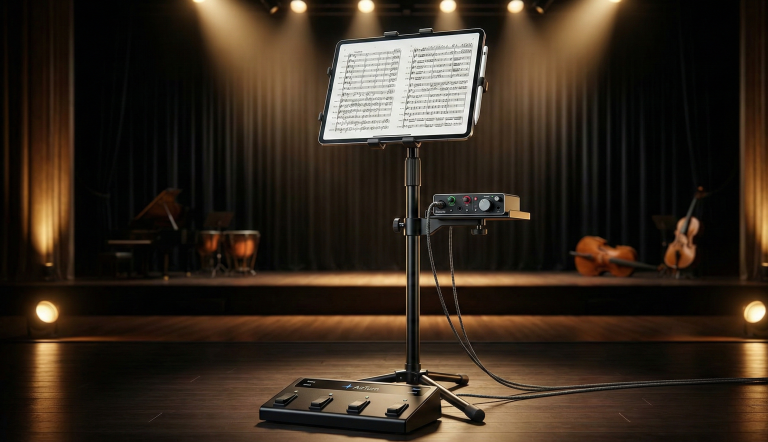
One of the most stressful aspects of piano performance is the page turn. Digital tablets combined with Bluetooth foot pedals (like the AirTurn or PageFlip) allow for hands-free page turning. This ensures that the flow of a performance is never interrupted by a missed grab or a page that refuses to stay flat.
As an Amazon Associate I earn from qualifying purchases.
As an Amazon Associate I earn from qualifying purchases.
3. Technical Comparison: Feature Analysis
| Feature | Traditional Sheet Music | Digital Tablet (e.g., iPad/Surface) |
| Initial Cost | Low (Price of the book) | High ($500 – $1,200+) |
| Long-term Cost | High (Buying individual scores) | Low (IMSLP free downloads / Subscriptions) |
| Annotation | Permanent (unless pencil) | Flexible, Layered, Reversible |
| Eye Strain | Minimal | Moderate to High (due to Blue Light) |
| Page Turns | Manual (Requires hands) | Hands-free (via Bluetooth Pedal) |
| Searchability | Manual (Index) | Instant (Metadata/Search bar) |
| Reliability | 100% (No battery/crashes) | ~98% (Requires battery/software) |
4. Ergonomics and Reading Comfort
When evaluating Sheet Music vs Digital Tablets, ergonomics play a vital role. The standard size of a professional music score is roughly 9×12 inches (or larger for orchestral scores).
The Screen Size Factor
To replicate the experience of a standard score, a tablet must have a large screen. The iPad Pro 12.9-inch is currently the industry standard because its screen dimensions closely mimic the width of a printed page. The Apple iPad Air 13-inch is the best choice for price and durability. Using a smaller 10-inch tablet often forces the pianist to zoom in, which disrupts the vertical flow of the music and makes reading ahead significantly more difficult.
Backlighting and Contrast
Digital tablets excel in low-light environments, such as pit orchestras or dim practice rooms. The ability to adjust brightness and contrast is a major advantage for older musicians or those with visual impairments. Conversely, in bright sunlight, traditional paper remains superior, as screen glare can render a digital score unreadable.
5. Cost Analysis and Accessibility
The Investment Gap
A high-quality digital setup involves:
- The Tablet: $800 – $1,100.
- The Stylus: $100.
- The Foot Pedal: $70 – $100.
- The Software: $20 – $50.
Totaling over $1,000, this is a significant upfront investment. However, for a student who would otherwise spend $50 per Urtext volume, the tablet pays for itself within two to three years of serious study.
Public Domain and Instant Access
The International Music Score Library Project (IMSLP) provides free access to nearly all music in the public domain. A digital tablet allows a pianist to hear a piece on YouTube and, within seconds, be playing from the score. This democratization of music access is arguably the greatest benefit of the digital era.
6. Performance vs. Practice: When to Use Which?
For Focused Practice: Choose Paper
When learning a new piece, the distractions of a tablet (notifications, the urge to check email, or the fatigue of a screen) can hinder deep focus. The physical resistance of paper and the “analog” nature of a pencil allow for a meditative state known as “flow.”
For Performance and Gigs: Choose Digital
In a professional setting, the ability to create “Setlists” and jump between pieces instantly is invaluable. For wedding pianists or cocktail performers, having a searchable database of 500+ requests is far superior to hauling multiple fake books.
Recommended Gear & Products
To optimize your transition to digital or enhance your physical library, consider the following high-performance tools:
Digital Essentials
- Apple iPad Air 13-inch: The undisputed king of digital sheet music. The large display is essential for reading complex scores.
As an Amazon Associate I earn from qualifying purchases.
- AirTurn DUO 500: A silent, professional-grade Bluetooth foot pedal for seamless page turns.
As an Amazon Associate I earn from qualifying purchases.
- Apple Pencil Pro: For precise annotations and fingerings.
As an Amazon Associate I earn from qualifying purchases.
- Paperlike Screen Protector: A matte protector that reduces glare and gives the screen a paper-like feel for writing.
Essentials Accessories
- Hercules Stands (Tablet and Phone Holder): This versatile accessory allows you to securely mount your digital device to any existing music or microphone stand, providing flexible viewing angles for both tablets and smartphones.
As an Amazon Associate I earn from qualifying purchases.
- K&M 19790 Tablet PC Stand: A premium, heavy-duty German-engineered stand designed for professionals who require maximum stability and a secure locking mechanism for high-end tablets during live performances.
As an Amazon Associate I earn from qualifying purchases.
- Cahaya Music Stand for Sheet Music: A robust and portable solution for those who prefer physical scores, offering a wide desk and adjustable height that accommodates even the heaviest anthology volumes.
As an Amazon Associate I earn from qualifying purchases.
Conclusion
The debate between Sheet Music vs. Digital Tablets does not require a winner. Instead, it invites a hybrid approach. The modern pianist is best served by utilizing the digital tablet for its logistical prowess, performing, traveling, and managing a massive library, while maintaining a physical library of core repertoire for deep, scholarly study and long-term preservation.
Embracing technology does not mean abandoning tradition; it means providing yourself with the best possible tools to let your passion for the piano flourish. Whether you prefer the scent of fresh ink or the glow of a high-definition screen, the ultimate goal remains the same: the pursuit of musical excellence.
The most successful contemporary pianists are those who embrace a hybrid workflow. They purchase high-quality physical scores for their core repertoire, building a library that acts as a tangible record of their artistic growth, and utilize a 13-inch tablet equipped with a silent Bluetooth pedal for their broader library, gigging needs, and collaborative projects. By marrying the cognitive depth of paper with the logistical prowess of digital, the modern pianist ensures their journey is both historically informed and future-ready.
Can I use a regular Kindle for sheet music?
Generally, no. A standard Kindle (6-7 inches) is far too small for complex piano music. However, large-format E-ink tablets like the Onyx Boox Lumi (13.3 inches) are excellent alternatives for those who want the eye-comfort of paper with the convenience of digital.
Do digital tablets crash during performances?
While rare, software glitches can happen. Professional pianists often use “Airplane Mode” and ensure their tablet is at 100% battery before a concert. Many also keep a printed backup or a second tablet (redundancy) for high-stakes performances.
Is digital sheet music legal?
Yes, as long as you source it from reputable sites. IMSLP is legal for public domain works. For copyrighted modern music, sites like Musicnotes or Sheet Music Plus sell digital versions that include a license for personal use.
Does the blue light from tablets affect sleep?
Yes. Practicing late at night on a backlit tablet can suppress melatonin. It is recommended to use “Night Shift” mode or wear blue-light-blocking glasses if practicing in the evening.
How can I avoid eye strain during long practice sessions on a tablet?
Professionals recommend three strategies: 1) Switch to “Dark Mode” (white notes on a black background) to reduce light emission; 2) Use a matte screen protector, such as “Paperlike,” to reduce glare; and 3) Utilize the device’s “Night Shift” or blue-light filter to warm the color temperature.